
In order to create a backup of your website via cPanel, follow the guideline:
First, you need to connect to your cPanel dashboard, which you can do by following steps:
- Log in to your account in our Clients Area: https://portal.mycloud.my/clientarea.php
- Choose your Web Hosting(cPanel) service;
- Press the button “Access Control Panel” on the left menu and then the button “Click here to access control panel“.
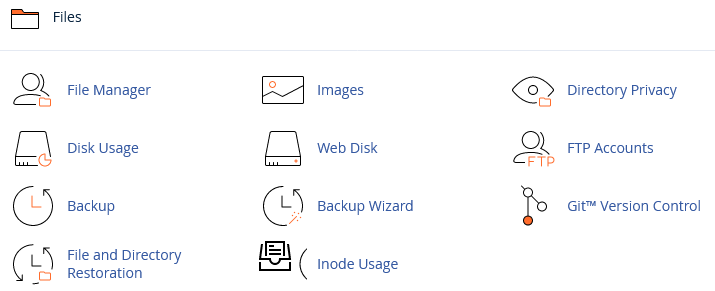
From this point, you need to choose “Backup” button on the “Files” section and you will be presented with the following options:

In this menu, you can backup any part of your cPanel files, Website, MySQL databases, Email Forwarders and etc. In this article, we will present the option to backup your full website. So to proceed further press the button “Download a Full Website Backup“.

The picture above is the main view for your website backups. If you have any backups already, saved on the server you can download them by pressing a specific link at “Backups Available for Download“.
In order to generate the backup, check the part “Generate a Full Backup“. Select a backup destination, which has few options:
- Home Directory — Select this option to save the backup file to the server.
- Remote FTP Server — Select this option to use FTP to store the backup file on a remote server.
- Remote FTP Server (Passive Mode Transfer) — Select this option to use passive FTP to store the backup file on a remote server.
- SCP — Select this option to use secure copy protocol (SCP) to store the backup file on a remote server.
Also, you can provide the email address, which will be used to notify you when the backup is ready (it is optional). Once you select where do you want to store the backup, press “Generate Backup“.
Backup generation time depends on how many files are stored on your server and you will receive an email notification if you have chosen such an option.